
(function () { function textOf(el) { return (el && el.textContent || "").replace(/\s+/g, " ").trim(); } function resolveItemUrl() { var match = window.location.search.match(/[?&]item=(\d+)/); if (!match) { return null; } return window.location.origin + "/a-" + match[1] + "/"; } function loadAccordion() { var url = resolveItemUrl(); if (!url) { return Promise.resolve(null); } return new Promise(function (resolve, reject) { var xhr = new XMLHttpRequest(); xhr.open("GET", url, true); xhr.onload = function () { if (xhr.status < 200 || xhr.status >= 400) { reject(new Error("item page " + xhr.status)); return; } var doc = new DOMParser().parseFromString(xhr.responseText, "text/html"); resolve(doc.querySelector(".phywe-item-accordion")); }; xhr.onerror = function () { reject(new Error("item page network error")); }; xhr.send(); }); } function parseItemBlocks(scope, withQuantity) { if (!scope) { return []; } var rows = scope.querySelectorAll(".itemslist .row.itemblocks"); var items = []; for (var i = 0; i < rows.length; i++) { var cols = rows[i].children; if (!cols.length) { continue; } var nameLink = cols[0].querySelector("a"); var numberLink = cols[1] ? cols[1].querySelector("a") : null; var item = { name: textOf(nameLink || cols[0]), mappedTo: textOf(numberLink) }; if (withQuantity && cols[2]) { var qty = parseInt(textOf(cols[2]).replace(/[^\d]/g, ""), 10); item.quantity = isNaN(qty) ? textOf(cols[2]) : String(qty); } if (item.name) { items.push(item); } } return items; } function fillTable(tableId, items, withQuantity) { var table = document.getElementById(tableId); if (!table || !items.length) { return; } var tbody = table.querySelector("tbody"); for (var i = 0; i < items.length; i++) { var tr = document.createElement("tr"); var nameTd = document.createElement("td"); nameTd.style.width = "80%"; nameTd.textContent = items[i].name; tr.appendChild(nameTd); var numberTd = document.createElement("td"); numberTd.textContent = items[i].mappedTo; tr.appendChild(numberTd); if (withQuantity) { var qtyTd = document.createElement("td"); qtyTd.textContent = items[i].quantity || ""; tr.appendChild(qtyTd); } tbody.appendChild(tr); } var wrapper = table.parentElement; while (wrapper && wrapper.className.indexOf("printtablediv") === -1) { wrapper = wrapper.parentElement; } if (wrapper) { wrapper.style.display = ""; } } function stepTitle(stepEl) { if (!stepEl) { return ""; } var titleEl = stepEl.querySelector(".card-header button div") || stepEl.querySelector(".card-header button"); return textOf(titleEl); } function setHeadline(tableId, title) { var headline = document.querySelector("#" + tableId + " .printtableheadline"); if (headline && title) { headline.textContent = title; } } function parseMedia(scope) { if (!scope) { return []; } var rows = scope.querySelectorAll(".itemslist .row.itemblocks"); var items = []; for (var i = 0; i < rows.length; i++) { var cols = rows[i].children; if (!cols.length) { continue; } var nameLink = cols[0].querySelector("a"); var fileLink = cols[1] ? cols[1].querySelector("a") : null; var item = { name: textOf(nameLink || cols[0]), mappedTo: textOf(fileLink || cols[1]), quantity: cols[2] ? textOf(cols[2]) : "" }; if (item.name) { items.push(item); } } return items; } function fillFromAccordion(accordion) { if (!accordion) { return; } var versucheStep = accordion.querySelector('[data-step="versuche"]'); var versuche = parseItemBlocks(versucheStep, false); setHeadline("print-versuche", stepTitle(versucheStep)); fillTable("print-versuche", versuche, false); var lieferumfangStep = accordion.querySelector('[data-step="lieferumfang"]'); var lieferumfang = parseItemBlocks(lieferumfangStep, true); fillTable("print-lieferumfang", lieferumfang, true); var zubehoer = accordion.querySelector('[data-step="zubehoer"]'); var sections = zubehoer ? zubehoer.querySelectorAll(".card-body") : []; var notwendig = []; var empfohlen = []; for (var i = 0; i < sections.length; i++) { var items = parseItemBlocks(sections[i], false); if (sections[i].querySelector(".text-red, .icon-warning-black")) { notwendig = items; } else if (sections[i].querySelector(".text-green, .icon-Mehrwert_black")) { empfohlen = items; } } fillTable("print-zubehoer-notwendig", notwendig, false); fillTable("print-zubehoer-empfohlen", empfohlen, false); var mediaStep = accordion.querySelector('[data-step="media"]'); var media = parseMedia(mediaStep); setHeadline("print-media", stepTitle(mediaStep)); fillTable("print-media", media, true); } function start() { var itemUrl = resolveItemUrl(); if (!itemUrl) { setTimeout(function () { window.print(); }, 2000); return; } loadAccordion() .then(function (accordion) { fillFromAccordion(accordion); }) .catch(function (err) { if (window.console && console.warn) { console.warn("Accordion konnte nicht geladen werden:", resolveItemUrl(), err); } }) .then(function () { setTimeout(function () { window.print(); }, 500); }); } if (document.readyState === "loading") { document.addEventListener("DOMContentLoaded", start); } else { start(); } })();
 

Technical data


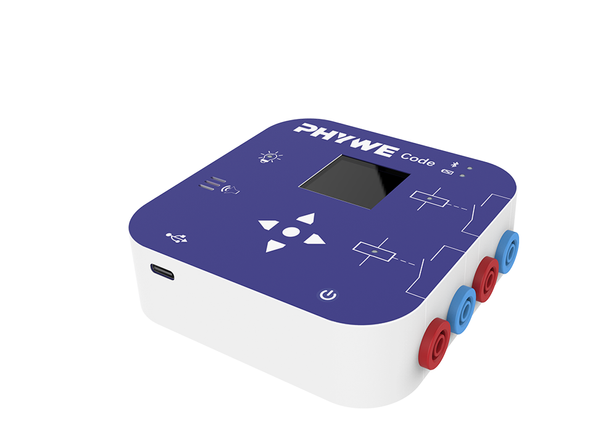
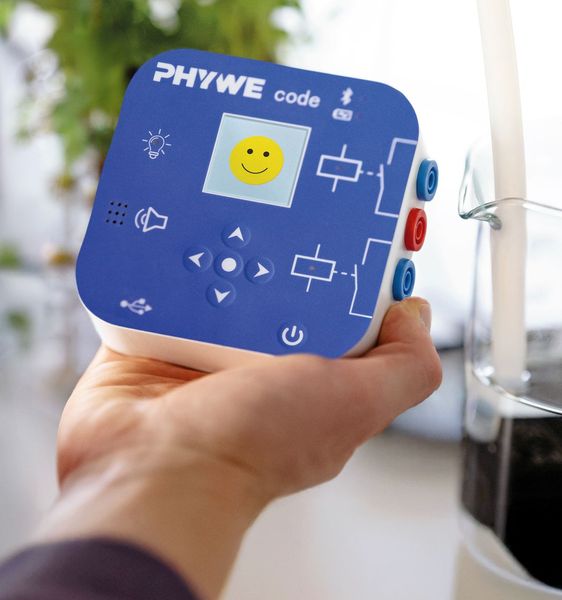
Cobra SMARTsense Code - Output device for switching relays, LEDs, display

Article no: 12953-00

Function and Application

The Cobra SMARTsense Code is a programmable output device (actuator) that combines with all Cobra SMARTsense sensors. In the free measureAPP, pupils program 2 relays, LEDs, speaker and display visually via Blockly integration or via the trigger function – no programming experience required. From simple switching logic to complex automation: the output elements respond directly to sensor values, making programming concepts tangible and hands-on.

Cobra SMARTsense Code has a variety of output elements such as 2 relays, LEDs, speakers and a color display. These output elements can be perfectly combined with other SMARTsense sensors and thus offer an easy way to learn the basics of automation and home automation.

Watch the Cobra SMARTsense Code on video!

Benefits

  • Blockly integration – Program the actuator visually by drag-and-drop directly in the measureAPP – no programming knowledge required.
  • Simplicity – Get started straight away with any Bluetooth-enabled device and the free measureAPP.
  • Real-time feedback – Output elements respond immediately to sensor values, cause and effect directly visible.
  • Versatile output elements – Relays, RGB LED, speaker and colour display in one device.
  • Real-world applications – The 2 relays allow real electrical loads to be switched.
  • Maximum compatibility – Works with all Cobra SMARTsense sensors.

Equipment and Technical Data

  • 2x Relais:
    • Max. Switching power DC: 30V / 10A
    • Max. Switching power AC: 250V / 10A
  • RGB LED
  • OLED-Display:
    • Size: 1,44 "
    • Resolution: 128x128 Pixel
    • Colors: 65.000
  • Loudspeaker:
    • Frequency Range: 10 Hz ... 10000 Hz
  • 5x Input Buttons
  • Bluetooth version: 5.4

The sensor contains a USB-C rechargeable lithium polymer battery.


PHYWE Systeme GmbH & Co. KG
Robert-Bosch-Breite 10 – 37079 Göttingen – Germany
www.phywe.com

Contact