
(function () { function textOf(el) { return (el && el.textContent || "").replace(/\s+/g, " ").trim(); } function resolveItemUrl() { var match = window.location.search.match(/[?&]item=(\d+)/); if (!match) { return null; } return window.location.origin + "/a-" + match[1] + "/"; } function loadAccordion() { var url = resolveItemUrl(); if (!url) { return Promise.resolve(null); } return new Promise(function (resolve, reject) { var xhr = new XMLHttpRequest(); xhr.open("GET", url, true); xhr.onload = function () { if (xhr.status < 200 || xhr.status >= 400) { reject(new Error("item page " + xhr.status)); return; } var doc = new DOMParser().parseFromString(xhr.responseText, "text/html"); resolve(doc.querySelector(".phywe-item-accordion")); }; xhr.onerror = function () { reject(new Error("item page network error")); }; xhr.send(); }); } function parseItemBlocks(scope, withQuantity) { if (!scope) { return []; } var rows = scope.querySelectorAll(".itemslist .row.itemblocks"); var items = []; for (var i = 0; i < rows.length; i++) { var cols = rows[i].children; if (!cols.length) { continue; } var nameLink = cols[0].querySelector("a"); var numberLink = cols[1] ? cols[1].querySelector("a") : null; var item = { name: textOf(nameLink || cols[0]), mappedTo: textOf(numberLink) }; if (withQuantity && cols[2]) { var qty = parseInt(textOf(cols[2]).replace(/[^\d]/g, ""), 10); item.quantity = isNaN(qty) ? textOf(cols[2]) : String(qty); } if (item.name) { items.push(item); } } return items; } function fillTable(tableId, items, withQuantity) { var table = document.getElementById(tableId); if (!table || !items.length) { return; } var tbody = table.querySelector("tbody"); for (var i = 0; i < items.length; i++) { var tr = document.createElement("tr"); var nameTd = document.createElement("td"); nameTd.style.width = "80%"; nameTd.textContent = items[i].name; tr.appendChild(nameTd); var numberTd = document.createElement("td"); numberTd.textContent = items[i].mappedTo; tr.appendChild(numberTd); if (withQuantity) { var qtyTd = document.createElement("td"); qtyTd.textContent = items[i].quantity || ""; tr.appendChild(qtyTd); } tbody.appendChild(tr); } var wrapper = table.parentElement; while (wrapper && wrapper.className.indexOf("printtablediv") === -1) { wrapper = wrapper.parentElement; } if (wrapper) { wrapper.style.display = ""; } } function stepTitle(stepEl) { if (!stepEl) { return ""; } var titleEl = stepEl.querySelector(".card-header button div") || stepEl.querySelector(".card-header button"); return textOf(titleEl); } function setHeadline(tableId, title) { var headline = document.querySelector("#" + tableId + " .printtableheadline"); if (headline && title) { headline.textContent = title; } } function parseMedia(scope) { if (!scope) { return []; } var rows = scope.querySelectorAll(".itemslist .row.itemblocks"); var items = []; for (var i = 0; i < rows.length; i++) { var cols = rows[i].children; if (!cols.length) { continue; } var nameLink = cols[0].querySelector("a"); var fileLink = cols[1] ? cols[1].querySelector("a") : null; var item = { name: textOf(nameLink || cols[0]), mappedTo: textOf(fileLink || cols[1]), quantity: cols[2] ? textOf(cols[2]) : "" }; if (item.name) { items.push(item); } } return items; } function fillFromAccordion(accordion) { if (!accordion) { return; } var versucheStep = accordion.querySelector('[data-step="versuche"]'); var versuche = parseItemBlocks(versucheStep, false); setHeadline("print-versuche", stepTitle(versucheStep)); fillTable("print-versuche", versuche, false); var lieferumfangStep = accordion.querySelector('[data-step="lieferumfang"]'); var lieferumfang = parseItemBlocks(lieferumfangStep, true); fillTable("print-lieferumfang", lieferumfang, true); var zubehoer = accordion.querySelector('[data-step="zubehoer"]'); var sections = zubehoer ? zubehoer.querySelectorAll(".card-body") : []; var notwendig = []; var empfohlen = []; for (var i = 0; i < sections.length; i++) { var items = parseItemBlocks(sections[i], false); if (sections[i].querySelector(".text-red, .icon-warning-black")) { notwendig = items; } else if (sections[i].querySelector(".text-green, .icon-Mehrwert_black")) { empfohlen = items; } } fillTable("print-zubehoer-notwendig", notwendig, false); fillTable("print-zubehoer-empfohlen", empfohlen, false); var mediaStep = accordion.querySelector('[data-step="media"]'); var media = parseMedia(mediaStep); setHeadline("print-media", stepTitle(mediaStep)); fillTable("print-media", media, true); } function start() { var itemUrl = resolveItemUrl(); if (!itemUrl) { setTimeout(function () { window.print(); }, 2000); return; } loadAccordion() .then(function (accordion) { fillFromAccordion(accordion); }) .catch(function (err) { if (window.console && console.warn) { console.warn("Accordion konnte nicht geladen werden:", resolveItemUrl(), err); } }) .then(function () { setTimeout(function () { window.print(); }, 500); }); } if (document.readyState === "loading") { document.addEventListener("DOMContentLoaded", start); } else { start(); } })();
 

Technical data


Introduction to programming with Blockolino

Article no: P1480269

Principle

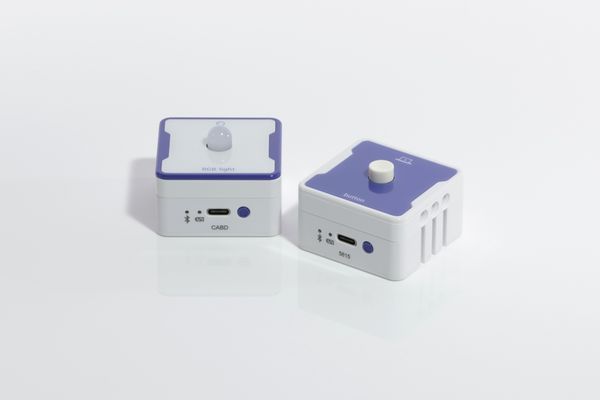
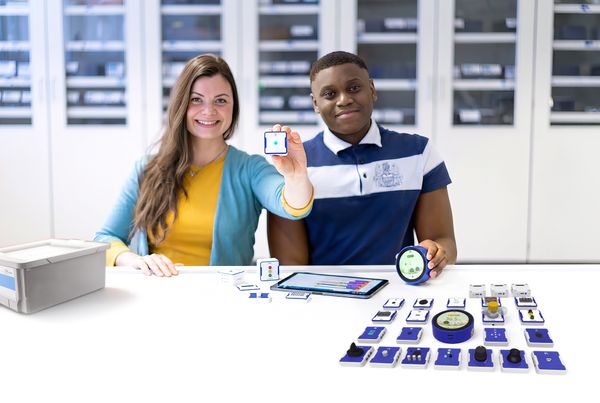
With Blockolino, students learn how to program a light switch using sensors, actuators and a small program. The Button sensor and the RGB Light actuator are magnetically attached to LinoLinks and connected to the LinoHub via Bluetooth. The program is created with the visual programming language Blockly by drag and drop on a tablet, smartphone or PC and is then transferred to the LinoHub: as soon as the button is pressed, the LED lights up green. This makes the principle of input – processing – output visible.

Tasks

  1. The students set up the experiment with the LinoHub, the Button sensor and the RGB Light actuator.
  2. In Blockly, they program the LED to light up green when the button is pressed and to go out when it is released.
  3. They transfer the program to the LinoHub and test its function.

Learning objectives

The students gain a first introduction to programming and understand how a program is structured from input (sensor), processing (code) and output (actuator). They recognise that Blockly blocks represent logical instructions that are executed in a fixed order. No programming knowledge is required.

Benefits

  • Easy introduction to programming without prior knowledge thanks to Blockly and drag and drop.
  • Quick setup thanks to magnetic LinoLinks and wireless connection via Bluetooth.
  • Immediately visible result of the self-written program.
  • Strong everyday relevance (e.g. light switch, traffic light control).
  • Promotes computational thinking according to the principle of input – processing – output.
  • Free Blockolino app for Android, iOS and Windows.
  • Suitable for partner work.
  • Quick experiment preparation (experiment instructions available).

PHYWE Systeme GmbH & Co. KG
Robert-Bosch-Breite 10 – 37079 Göttingen – Germany
www.phywe.com

Contact