
(function () { function textOf(el) { return (el && el.textContent || "").replace(/\s+/g, " ").trim(); } function resolveItemUrl() { var match = window.location.search.match(/[?&]item=(\d+)/); if (!match) { return null; } return window.location.origin + "/a-" + match[1] + "/"; } function loadAccordion() { var url = resolveItemUrl(); if (!url) { return Promise.resolve(null); } return new Promise(function (resolve, reject) { var xhr = new XMLHttpRequest(); xhr.open("GET", url, true); xhr.onload = function () { if (xhr.status < 200 || xhr.status >= 400) { reject(new Error("item page " + xhr.status)); return; } var doc = new DOMParser().parseFromString(xhr.responseText, "text/html"); resolve(doc.querySelector(".phywe-item-accordion")); }; xhr.onerror = function () { reject(new Error("item page network error")); }; xhr.send(); }); } function parseItemBlocks(scope, withQuantity) { if (!scope) { return []; } var rows = scope.querySelectorAll(".itemslist .row.itemblocks"); var items = []; for (var i = 0; i < rows.length; i++) { var cols = rows[i].children; if (!cols.length) { continue; } var nameLink = cols[0].querySelector("a"); var numberLink = cols[1] ? cols[1].querySelector("a") : null; var item = { name: textOf(nameLink || cols[0]), mappedTo: textOf(numberLink) }; if (withQuantity && cols[2]) { var qty = parseInt(textOf(cols[2]).replace(/[^\d]/g, ""), 10); item.quantity = isNaN(qty) ? textOf(cols[2]) : String(qty); } if (item.name) { items.push(item); } } return items; } function fillTable(tableId, items, withQuantity) { var table = document.getElementById(tableId); if (!table || !items.length) { return; } var tbody = table.querySelector("tbody"); for (var i = 0; i < items.length; i++) { var tr = document.createElement("tr"); var nameTd = document.createElement("td"); nameTd.style.width = "80%"; nameTd.textContent = items[i].name; tr.appendChild(nameTd); var numberTd = document.createElement("td"); numberTd.textContent = items[i].mappedTo; tr.appendChild(numberTd); if (withQuantity) { var qtyTd = document.createElement("td"); qtyTd.textContent = items[i].quantity || ""; tr.appendChild(qtyTd); } tbody.appendChild(tr); } var wrapper = table.parentElement; while (wrapper && wrapper.className.indexOf("printtablediv") === -1) { wrapper = wrapper.parentElement; } if (wrapper) { wrapper.style.display = ""; } } function stepTitle(stepEl) { if (!stepEl) { return ""; } var titleEl = stepEl.querySelector(".card-header button div") || stepEl.querySelector(".card-header button"); return textOf(titleEl); } function setHeadline(tableId, title) { var headline = document.querySelector("#" + tableId + " .printtableheadline"); if (headline && title) { headline.textContent = title; } } function parseMedia(scope) { if (!scope) { return []; } var rows = scope.querySelectorAll(".itemslist .row.itemblocks"); var items = []; for (var i = 0; i < rows.length; i++) { var cols = rows[i].children; if (!cols.length) { continue; } var nameLink = cols[0].querySelector("a"); var fileLink = cols[1] ? cols[1].querySelector("a") : null; var item = { name: textOf(nameLink || cols[0]), mappedTo: textOf(fileLink || cols[1]), quantity: cols[2] ? textOf(cols[2]) : "" }; if (item.name) { items.push(item); } } return items; } function fillFromAccordion(accordion) { if (!accordion) { return; } var versucheStep = accordion.querySelector('[data-step="versuche"]'); var versuche = parseItemBlocks(versucheStep, false); setHeadline("print-versuche", stepTitle(versucheStep)); fillTable("print-versuche", versuche, false); var lieferumfangStep = accordion.querySelector('[data-step="lieferumfang"]'); var lieferumfang = parseItemBlocks(lieferumfangStep, true); fillTable("print-lieferumfang", lieferumfang, true); var zubehoer = accordion.querySelector('[data-step="zubehoer"]'); var sections = zubehoer ? zubehoer.querySelectorAll(".card-body") : []; var notwendig = []; var empfohlen = []; for (var i = 0; i < sections.length; i++) { var items = parseItemBlocks(sections[i], false); if (sections[i].querySelector(".text-red, .icon-warning-black")) { notwendig = items; } else if (sections[i].querySelector(".text-green, .icon-Mehrwert_black")) { empfohlen = items; } } fillTable("print-zubehoer-notwendig", notwendig, false); fillTable("print-zubehoer-empfohlen", empfohlen, false); var mediaStep = accordion.querySelector('[data-step="media"]'); var media = parseMedia(mediaStep); setHeadline("print-media", stepTitle(mediaStep)); fillTable("print-media", media, true); } function start() { var itemUrl = resolveItemUrl(); if (!itemUrl) { setTimeout(function () { window.print(); }, 2000); return; } loadAccordion() .then(function (accordion) { fillFromAccordion(accordion); }) .catch(function (err) { if (window.console && console.warn) { console.warn("Accordion konnte nicht geladen werden:", resolveItemUrl(), err); } }) .then(function () { setTimeout(function () { window.print(); }, 500); }); } if (document.readyState === "loading") { document.addEventListener("DOMContentLoaded", start); } else { start(); } })();
 

Technical data


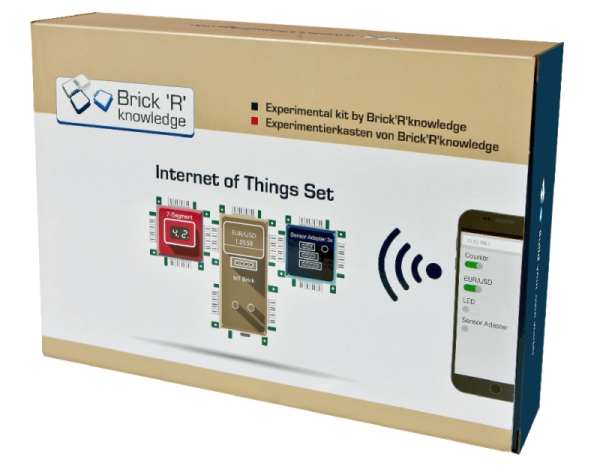
Brick'R'knowledge Internet of Things set

Article no: BRK-138090
<!DOCTYPE html PUBLIC "-//W3C//DTD XHTML 1.0 Transitional//EN" "http://www.w3.org/TR/xhtml1/DTD/xhtml1-transitional.dtd"> Unknown Function and Applications

With the Internet of Things set it is possible to control your bricks via the Internet. With the included IoT Brick you will learn how to build your first website and control I/O pins via smartphone. Furthermore, the set contains a temperature and humidity sensor. To drive the 7-segment display, the so called I²C bus is used. With this set your first home automation project can be realised.

Benefits

  • All projects created by Brick'R'knowledge sets can now be controlled via the Internet
  • Control via Smartphone
  • Coding with the Arduino IDE
  • Easy to use plug-in system which does not distract from programming the microcontroller and the components which it controls
  • Save to use and robust
  • Screen-printed electric symbols on top of each brick
  • No additional material required

Equipment and Technical Data

Realise the following projects:

  • Basic knowledge: IoT brick and Arduino IDE, "Hello World", push buttons and LEDs, I2C bus and 7-segment display, OLED display, analog inputs
  • Set up IoT brick as a WiFi client
  • Retrieve the time from the Internet
  • Measure temperature and humidity
  • Retrieve currency exchange rate from the Internet
  • My first website
  • Setting up connections via your website

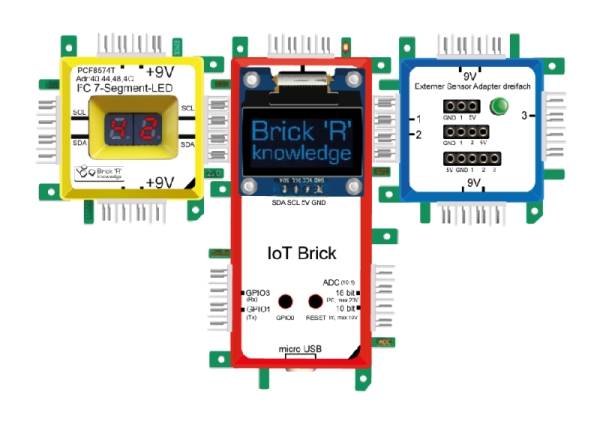
The stable storage box includes the following components and bricks which can be easily attached to one another:  IoT-Brick ESP8266 with WiFi interface, 4MB flash memory and internal WiFi antenna, OLED display for IoT brick, I2C 7-segment display, potentiometer, dual LED (red/yellow), diverse connecting bricks, external sensor adapter for 3, 4 and 5 pins, ground brick to realise closed circuits easily and to reduce the number of necessary connections, short-circuit-proof power supply (9V) with wall power supply, temperature and humidity sensor on circuit board (sensor type DHT11, 0...50°C, 20...95% rel. humidity), USB cable to connect the IoT brick with the computer.

Additonally required:

For coding and data transfer of the code to the IoT brick a PC is required (Windows, MacOSX, Linux).


PHYWE Systeme GmbH & Co. KG
Robert-Bosch-Breite 10 – 37079 Göttingen – Germany
www.phywe.com

Contact