Hier der vollständige Code. Geändert ist nur resolveItemUrl(), dazu kommt die neue Hilfsfunktion languagePrefix(). Die Sprache wird aus dem URL-Präfix der Druckseite übernommen, z. B. /es/. html
(function () { function textOf(el) { return (el && el.textContent || "").replace(/\s+/g, " ").trim(); } // Sprachpräfix der aktuellen Seite ermitteln, z. B. "/es" bei /es/druckseite?item=123 // Standardsprache (ohne Präfix) liefert "". function languagePrefix() { var m = window.location.pathname.match(/^\/([a-z]{2})(?=\/|$)/i); return m ? "/" + m[1].toLowerCase() : ""; } function resolveItemUrl() { var match = window.location.search.match(/[?&]item=(\d+)/); if (!match) { return null; } return window.location.origin + languagePrefix() + "/a-" + match[1] + "/"; } function loadAccordion() { var url = resolveItemUrl(); if (!url) { return Promise.resolve(null); } return new Promise(function (resolve, reject) { var xhr = new XMLHttpRequest(); xhr.open("GET", url, true); xhr.onload = function () { if (xhr.status < 200 || xhr.status >= 400) { reject(new Error("item page " + xhr.status)); return; } var doc = new DOMParser().parseFromString(xhr.responseText, "text/html"); resolve(doc.querySelector(".phywe-item-accordion")); }; xhr.onerror = function () { reject(new Error("item page network error")); }; xhr.send(); }); } function parseItemBlocks(scope, withQuantity) { if (!scope) { return []; } var rows = scope.querySelectorAll(".itemslist .row.itemblocks"); var items = []; for (var i = 0; i < rows.length; i++) { var cols = rows[i].children; if (!cols.length) { continue; } var nameLink = cols[0].querySelector("a"); var numberLink = cols[1] ? cols[1].querySelector("a") : null; var item = { name: textOf(nameLink || cols[0]), mappedTo: textOf(numberLink) }; if (withQuantity && cols[2]) { var qty = parseInt(textOf(cols[2]).replace(/[^\d]/g, ""), 10); item.quantity = isNaN(qty) ? textOf(cols[2]) : String(qty); } if (item.name) { items.push(item); } } return items; } function fillTable(tableId, items, withQuantity) { var table = document.getElementById(tableId); if (!table || !items.length) { return; } var tbody = table.querySelector("tbody"); for (var i = 0; i < items.length; i++) { var tr = document.createElement("tr"); var nameTd = document.createElement("td"); nameTd.style.width = "80%"; nameTd.textContent = items[i].name; tr.appendChild(nameTd); var numberTd = document.createElement("td"); numberTd.textContent = items[i].mappedTo; tr.appendChild(numberTd); if (withQuantity) { var qtyTd = document.createElement("td"); qtyTd.textContent = items[i].quantity || ""; tr.appendChild(qtyTd); } tbody.appendChild(tr); } var wrapper = table.parentElement; while (wrapper && wrapper.className.indexOf("printtablediv") === -1) { wrapper = wrapper.parentElement; } if (wrapper) { wrapper.style.display = ""; } } function stepTitle(stepEl) { if (!stepEl) { return ""; } var titleEl = stepEl.querySelector(".card-header button div") || stepEl.querySelector(".card-header button"); return textOf(titleEl); } function setHeadline(tableId, title) { var headline = document.querySelector("#" + tableId + " .printtableheadline"); if (headline && title) { headline.textContent = title; } } function parseMedia(scope) { if (!scope) { return []; } var rows = scope.querySelectorAll(".itemslist .row.itemblocks"); var items = []; for (var i = 0; i < rows.length; i++) { var cols = rows[i].children; if (!cols.length) { continue; } var nameLink = cols[0].querySelector("a"); var fileLink = cols[1] ? cols[1].querySelector("a") : null; var item = { name: textOf(nameLink || cols[0]), mappedTo: textOf(fileLink || cols[1]), quantity: cols[2] ? textOf(cols[2]) : "" }; if (item.name) { items.push(item); } } return items; } function fillFromAccordion(accordion) { if (!accordion) { return; } var versucheStep = accordion.querySelector('[data-step="versuche"]'); var versuche = parseItemBlocks(versucheStep, false); setHeadline("print-versuche", stepTitle(versucheStep)); fillTable("print-versuche", versuche, false); var lieferumfangStep = accordion.querySelector('[data-step="lieferumfang"]'); var lieferumfang = parseItemBlocks(lieferumfangStep, true); fillTable("print-lieferumfang", lieferumfang, true); var zubehoer = accordion.querySelector('[data-step="zubehoer"]'); var sections = zubehoer ? zubehoer.querySelectorAll(".card-body") : []; var notwendig = []; var empfohlen = []; for (var i = 0; i < sections.length; i++) { var items = parseItemBlocks(sections[i], false); if (sections[i].querySelector(".text-red, .icon-warning-black")) { notwendig = items; } else if (sections[i].querySelector(".text-green, .icon-Mehrwert_black")) { empfohlen = items; } } fillTable("print-zubehoer-notwendig", notwendig, false); fillTable("print-zubehoer-empfohlen", empfohlen, false); var mediaStep = accordion.querySelector('[data-step="media"]'); var media = parseMedia(mediaStep); setHeadline("print-media", stepTitle(mediaStep)); fillTable("print-media", media, true); } function start() { var itemUrl = resolveItemUrl(); if (!itemUrl) { setTimeout(function () { window.print(); }, 2000); return; } loadAccordion() .then(function (accordion) { fillFromAccordion(accordion); }) .catch(function (err) { if (window.console && console.warn) { console.warn("Accordion konnte nicht geladen werden:", itemUrl, err); } }) .then(function () { setTimeout(function () { window.print(); }, 500); }); } if (document.readyState === "loading") { document.addEventListener("DOMContentLoaded", start); } else { start(); } })();
 

Datos técnicos


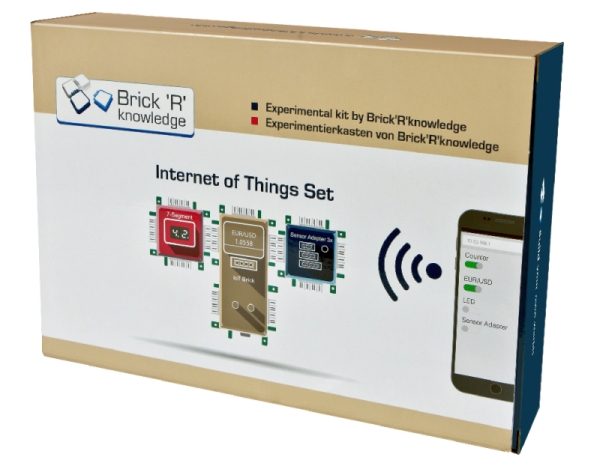
Set Internet de las cosas, Brick'R'knowledge

Nº de artículo BRK-138090
Funciones y uso

Con el set de Internet de las Cosas es posible controlar tus ladrillos a través de Internet. Con el ladrillo IoT incluido aprenderás a construir tu primera página web y a controlar los pines de E/S a través del smartphone. Además, el set contiene un sensor de temperatura y humedad. Para controlar la pantalla de 7 segmentos se utiliza el llamado bus I²C. Con este set se puede realizar tu primer proyecto de domótica.

Ventajas

  • Todos los proyectos creados por los sets de Brick'R'knowledge pueden ahora ser controlados a través de Internet
  • Control a través del Smartphone
  • Codificación con el IDE de Arduino
  • Sistema de plug-in fácil de usar que no distrae de la programación del microcontrolador y de los componentes que controla
  • Ahorro en el uso y robustez
  • Símbolos eléctricos serigrafiados en la parte superior de cada ladrillo
  • No requiere material adicional

Equipo y especificaciones técnicas

Realice los siguientes proyectos:

  • Conocimientos básicos: Ladrillo IoT y Arduino IDE, "Hello World", pulsadores y LEDs, bus I2C y pantalla de 7 segmentos, pantalla OLED, entradas analógicas
  • Configurar el ladrillo IoT como cliente WiFi
  • Recuperar la hora de Internet
  • Medir la temperatura y la humedad
  • Recuperar el tipo de cambio de moneda de Internet
  • Mi primer sitio web
  • Configurar las conexiones a través de su sitio web

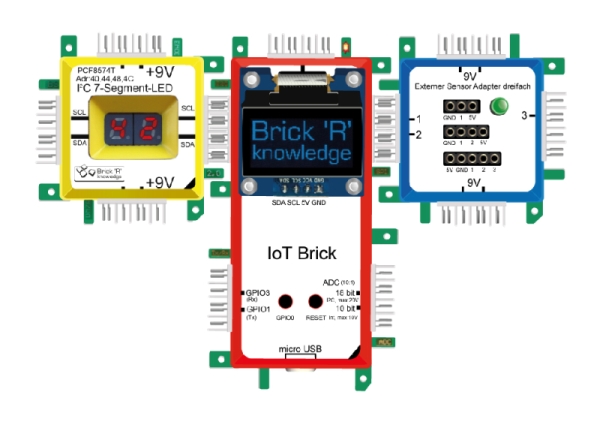
La caja de almacenamiento estable incluye los siguientes componentes y ladrillos que se pueden unir fácilmente entre sí:IoT-Brick ESP8266 con interfaz WiFi, memoria flash de 4MB y antena WiFi interna, pantalla OLED para el ladrillo IoT, pantalla I2C de 7 segmentos, potenciómetro, LED dual (rojo/amarillo), diversos ladrillos de conexión, adaptador de sensor externo para 3, 4y 5 pines, ladrillo de tierra para realizar fácilmente circuitos cerrados y reducir el número de conexiones necesarias, fuente de alimentación a prueba de cortocircuitos (9V) con alimentación de pared, sensor de temperatura y humedad en la placa de circuito (sensor tipo DHT11, 0....50°C, 20...95% humedad relativa), cable USB para conectar el ladrillo IoT con el ordenador.

Se requiere adicionalmente:

Para la codificación y transferencia de datos del código al ladrillo IoT se requiere un PC (Windows, MacOSX, Linux).


PHYWE Systeme GmbH & Co. KG
Robert-Bosch-Breite 10 – 37079 Göttingen – Deutschland
www.phywe.com

Contact